
One prompt. One paste into ChatGPT. A fully interactive moon orbit simulator with adjustable gravity, mass, orbital distance, and real-time moon phases, running in your browser in under a minute. The full prompt is below, ready to copy. If your kids are studying orbits, gravity, or planetary motion, this beats a textbook diagram by a wide margin. Let them break it. That’s where the learning happens.
This prompt came from a video on the AiSD YouTube channel (“5 ChatGPT Features You Missed“), where I showed ChatGPT building this tool live while I was talking to camera. Several people asked for the prompt itself, so here it is, along with everything you need to get it running and some ideas for turning it into a proper learning session.
What Does the Moon Orbit Simulator Actually Do?
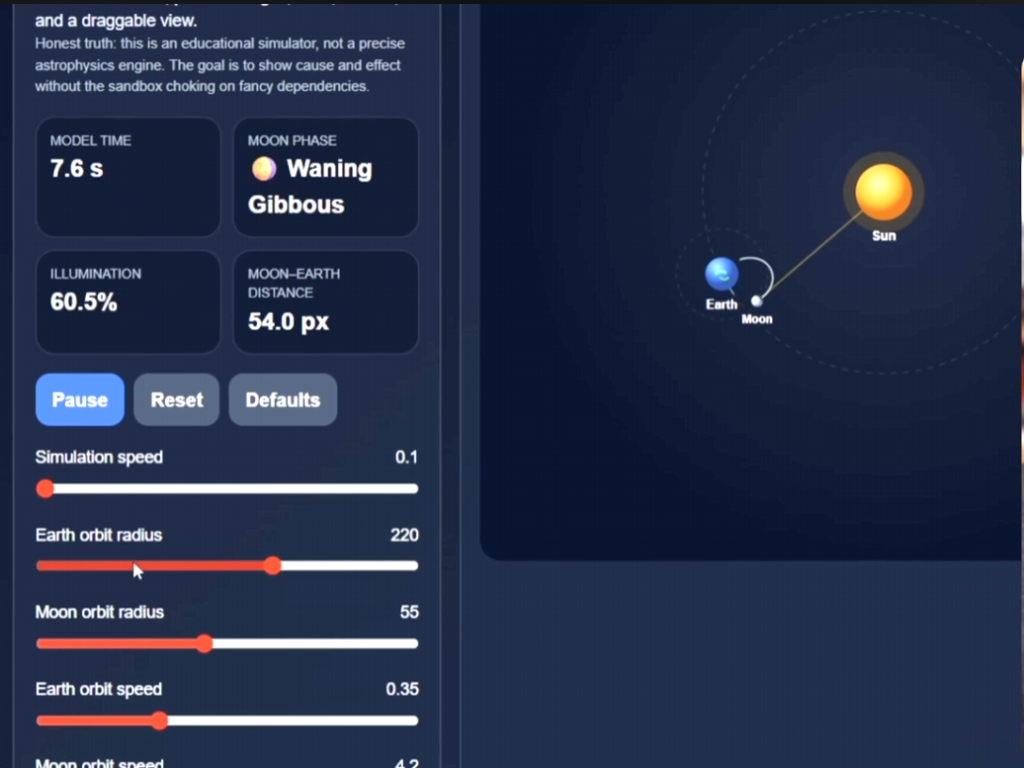
The simulator shows the Sun, Earth, and Moon in a pseudo-3D view rendered entirely in your browser. You control it through sliders and toggles. You can adjust simulation speed, the mass of the Sun, Earth, and Moon, orbital distances, starting speeds, the Moon’s orbital inclination, and camera angle. You can toggle trails, velocity vectors, labels, grid lines, and sunlight shading on and off.
The moon phases update based on actual Sun-Earth-Moon geometry rather than a pre-set animation. When you change the gravitational pull or push the Moon further out, the orbit responds in real time. It is a physics sandbox, built from a single prompt.
What You Need Before You Start
ChatGPT Plus, Team, or Enterprise. The free tier may work, but code execution and canvas features are less reliable on free accounts. The prompt asks ChatGPT to build a React component, so you will want to use it inside ChatGPT’s canvas or code output mode. No extra software, no downloads, no accounts beyond ChatGPT itself.
How to Use the Prompt (5 Steps)
- Copy the full prompt from the section below.
- Open a new ChatGPT conversation.
- Paste the prompt and hit enter.
- Wait for the code to generate (30 to 60 seconds depending on server load).
- Click preview. Start adjusting the sliders.
That is it. No configuration, no dependencies, no command line. Paste and play.
How to Turn This Into a Learning Session With Your Kids
This is where it gets interesting for parents. The simulator is a sandbox. The real learning comes from breaking things on purpose and watching what happens.
Push the Earth orbit radius down to minimum and watch what happens when it gets too close to the Sun. Increase the Moon’s mass and see how the orbit destabilises. Crank the simulation speed up and watch the trail patterns form. Change the camera pitch to see the orbital plane from different angles.
If your children are studying space science or physics at school, give them 15 minutes with this and a simple question: “What happens if you make the Moon heavier than the Earth?” They will learn more about gravitational relationships from five minutes of slider-adjusting than from a page of diagrams. And they will remember it, because they discovered it themselves.
For more hands-on projects like this, browse the full collection of AI family activities.
Why the Prompt Is So Long
A fair question. The prompt below is detailed and specific. That is deliberate.
Vague prompts produce broken code. If you tell ChatGPT “make me a moon simulator,” you will get something that half-works and crashes when you interact with it. The more specific you are about technical constraints (what libraries to use, what to avoid, how to handle errors), the more reliable the output.
This prompt specifies the rendering approach (SVG, no WebGL), the exact UI components, the mathematical helpers, the simulation physics, the error handling, and even a set of built-in sanity checks. The result is a tool that works first time, every time.
Use the tools available! After a few back and forths with ChatGPT getting this to how I wanted it, I asked ChatGPT to create the specific prompt for me!
The Full Prompt
Copy everything inside the code block below. Paste it into a new ChatGPT conversation. Hit enter.
Build a single-file React component called MoonOrbitInteractiveTool that creates a stable, interactive Moon orbit simulator.

Goal:
Show the orbit pattern clearly and reliably. Prioritise a working tool over flashy rendering. The tool must be interactive, visually clean, and robust in sandboxed environments.

Critical technical constraints:
- Do not use framer-motion.
- Do not use three, @react-three/fiber, @react-three/drei, WebGL, canvas-based 3D engines, or any dependency that could fail in restricted runtimes.
- Use pure React plus SVG for rendering.
- You may use shadcn/ui components already available in the environment:
  Card, CardContent, CardHeader, CardTitle, Button, Slider, Switch, Label, Badge, Separator.
- You may use lucide-react icons.
- Keep everything in one file.
- Default export must be the component.
- The code must be defensive against undefined or invalid values.

Core behaviour:
- Display the Sun, Earth, and Moon.
- Show the Earth orbiting the Sun and the Moon orbiting the Earth.
- Show the orbit pattern clearly at all times.
- Use a gravity-based simulation with the Sun fixed at the origin.
- Use pseudo-3D projection with SVG, not true 3D rendering.
- Let the user drag the main SVG scene to rotate the camera view.
- Include camera yaw and pitch controls.
- Show Moon phases based on Sun–Earth–Moon geometry, not fake sprite swapping.
- Show live telemetry such as:
  - model time
  - Moon phase
  - illumination percentage
  - Moon–Earth distance
  - Earth–Sun distance
  - current view mode

UI requirements:
- Left panel with controls and stats inside a dark, modern card layout.
- Right panel with the SVG simulation viewport.
- Include badges like Stable, Interactive, No 3D runtime.
- Use a dark space-themed background.
- Make it responsive enough to work in a standard desktop preview.

Controls to include:
- Play / Pause
- Reset
- Defaults
- Sliders for:
  - simulation speed
  - Sun mass
  - Earth mass
  - Moon mass
  - Earth–Sun distance
  - Moon–Earth distance
  - Earth starting speed
  - Moon starting speed
  - Moon orbital inclination
  - camera yaw
  - camera pitch
  - visual size exaggeration
- Toggles for:
  - show trails
  - show vectors
  - show labels
  - show orbit plane
  - show phase info
  - use sunlight shading
  - show grid

Math and helper requirements:
- Implement safeNumber(value, fallback = 0)
- Implement clamp(v, min, max) so it safely handles undefined, invalid numbers, and reversed min/max
- Implement fmt(n, d = 1) so it never throws and clamps decimal precision
- Implement helpers for:
  - degToRad
  - rotateX
  - rotateY
  - projectPoint
  - vectorLength
  - normalize
  - subtract
  - add
  - scale
  - dot
  - crossY
- Use pseudo-perspective projection to render 3D-like motion into SVG.

Simulation requirements:
- Create a createSimulation(params) function that initialises:
  - Sun position and mass
  - Earth position, velocity, mass
  - Moon position, velocity, mass
- Use accelerationFor(targetPos, attractors, G) to compute gravity safely.
- Clamp minimum distance squared to avoid numerical blowups.
- Advance the simulation using requestAnimationFrame and substeps.
- Reset the simulation whenever core orbital parameters change:
  - Sun mass
  - Earth mass
  - Moon mass
  - Earth–Sun distance
  - Moon–Earth distance
  - Earth speed scale
  - Moon speed scale
  - inclination

Rendering requirements:
- Use SVG with gradients for Sun, Earth, and Moon.
- Draw Earth orbit path and Moon orbit path.
- Draw optional trails for Earth and Moon.
- Draw an optional grid.
- Draw optional vectors for Earth velocity, Moon velocity, and gravity.
- Render Moon phase shading with SVG geometry based on illumination and waxing/waning state.
- Draw labels only when enabled.
- Keep the orbit pattern readable even when the camera is rotated.

Interaction requirements:
- Dragging the SVG should update camera yaw and pitch.
- Clamp pitch to a sensible range like -75 to 75 degrees.
- Sliders must safely read values from Slider arrays with optional chaining and fallback handling.

State requirements:
- Use React hooks only.
- Keep simulation state, params, tests, drag state, trails, and RAF refs inside the component.
- Maintain trails in refs and trim them to a reasonable length.

Testing and sanity checks:
Add a built-in runSanityChecks() function and show its results in the UI.
Include tests for at least:
- clamp lower bound
- clamp upper bound
- clamp handles undefined
- fmt handles undefined
- fmt bounds decimals
- phaseName full moon
- phaseEmoji new moon
- Earth starts at configured distance
- Moon starts relative to Earth
- gravity points inward
- gravity remains finite
- projection yields finite x
- projection yields finite y

Design philosophy:
- A stable pseudo-3D SVG simulator is better than a broken WebGL demo.
- The orbit pattern must be obvious.
- Keep the code clean, readable, and self-contained.
- Make it robust in sandbox environments where advanced rendering or animation packages may fail.

Output:
Return only the complete React component code, ready to paste into a single file.
What This Teaches About Prompting (Not Just Physics)
The approach behind this prompt applies to any tool you want an AI to build. Be specific about what you want. Be explicit about what to avoid. Define the error handling. Specify the output format. The difference between a prompt that produces a working tool and one that produces a broken prototype is almost always specificity.
If you are building AI tools for your family, whether that is a homework helper, a meal planner, or a calendar organiser, the same principle holds. Tell the AI exactly what you want, exactly what you do not want, and exactly how to handle things when they go wrong.
You can find more AI tools and techniques in the education hub, or browse the blog for step-by-step guides on building your own family automations.
Watch the Video
This prompt is from “5 ChatGPT Features You Missed” on the AiSD YouTube channel. The moon orbit simulator is Feature 5 in the video.
Want More Prompts Like This?
The AiSD newsletter sends one practical AI technique every week. No hype, no filler, just things you can use that day.
Stay peachy.